Can I Use WhatsApp Overseas Without Roaming?
Yes. You can use WhatsApp overseas without using your home mobile carrier's data roaming service. WhatsApp works over an internet connection, so you can send messages, make WhatsApp voice or video calls, and share media using Wi-Fi or a separate travel data eSIM or SIM Card.
This can be useful when travelling internationally because you can keep using WhatsApp while directing mobile data through a prepaid travel Data Plan rather than your regular home mobile data line.
The important distinction is between your WhatsApp phone number and the internet connection WhatsApp uses. They do not have to come from the same SIM Card.
How Does WhatsApp Work When You Travel Abroad?

WhatsApp uses internet data rather than traditional cellular voice minutes or SMS for its normal messaging and calling features.
When travelling, WhatsApp can use:
- Hotel, airport, café, or other Wi-Fi
- A prepaid travel eSIM Data Plan
- A prepaid physical travel SIM Card Data Plan
- Another mobile-data connection available to your device
As long as the phone has an internet connection and your WhatsApp account remains active, you can continue using the app abroad.
Can I Keep My Existing WhatsApp Number?
Yes. Adding or swapping to another SIM Card or eSIM for mobile data does not automatically change the phone number registered to your WhatsApp account.
This means you can keep WhatsApp registered to your usual phone number while using a separate WraptelDataSIM eSIM or SIM Card for internet access.
You generally should not use WhatsApp's Change Number feature simply because you are using a different SIM or eSIM for travel data. That feature is intended for situations where you actually want to move your WhatsApp account to a different phone number.
It is still useful to retain access to your registered number in case WhatsApp ever requires account verification.
Using WhatsApp With a Travel eSIM or SIM Card

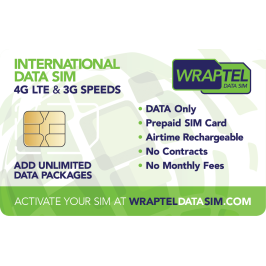
WraptelDataSIM provides data-only eSIM and physical SIM Card options that can be used with eligible prepaid Data Plans for supported international destinations.
Once your WraptelDataSIM eSIM or SIM Card is active and an eligible Data Plan has been added, you can use that mobile-data connection for WhatsApp as well as maps, email, browsing, travel apps, and other internet-based services.
The basic setup is:
- Activate your WraptelDataSIM eSIM or SIM Card
- Add a compatible Data Plan for your destination or itinerary
- Select the WraptelDataSIM line for mobile data on a compatible device
- Follow the required roaming and network settings for the travel data line
- Open WhatsApp normally once the device has internet access
WhatsApp does not need a special WraptelDataSIM account or configuration. It simply uses the internet connection provided by the active Data Plan.
Do I Need to Turn Data Roaming Off?
This is where travel settings can become confusing.
If you want to avoid using your home carrier's mobile data abroad, you can disable Data Roaming on your home mobile line or make sure that line is not selected for cellular data.
However, a travel eSIM or SIM Card may need Data Roaming enabled on the travel line so it can connect to supported partner networks in your destination.
On a Dual SIM device, review each line separately:
- Home line: disable Data Roaming if you do not want that carrier providing mobile data abroad
- WraptelDataSIM line: select it for cellular data and use the roaming settings required for the travel service
Device menus vary, so confirm which line is selected for mobile data before using your phone abroad.
Using WhatsApp With Dual SIM

Dual SIM can be particularly useful for international travel.
On a compatible phone, you can keep your regular line installed while using a WraptelDataSIM eSIM or physical SIM Card as the mobile-data line.
WhatsApp can remain associated with the number you originally registered while its internet traffic uses the selected travel-data connection.
If you leave your home line active for calls or SMS, check your home carrier's international terms because charges for those services are separate from the mobile data being used by WhatsApp.
Can I Use WhatsApp Overseas With Wi-Fi Only?
Yes. WhatsApp can also be used over Wi-Fi without cellular mobile data.
That can work well while you are at a hotel, airport, restaurant, office, or another location with a usable Wi-Fi connection.
The limitation is that Wi-Fi may not be available while walking around, travelling between locations, using transportation, or navigating away from your accommodation.
Having a prepaid mobile Data Plan gives you another connection option when Wi-Fi is unavailable or when you prefer to use mobile data.
For broader information about device and account security while travelling, see How to Protect Your Data and Privacy While Travelling Abroad.
How Much Data Does WhatsApp Use?
The amount of mobile data WhatsApp uses depends heavily on what you do in the app.
Text messaging generally uses relatively little data. Usage increases when you:
- Send or receive large photos and videos
- Make voice calls
- Make video calls
- Download media automatically
- Back up chats and media using mobile data
If WhatsApp will be one of your main communication tools during the trip, include calls, media sharing, and backups when thinking about your expected data needs.
Reduce WhatsApp Data Use While Travelling

If you are using a Fixed Data Plan or simply want to reduce unnecessary mobile-data use, review WhatsApp's storage, media-download, calling, and backup settings before travelling.
Useful steps can include:
- Limit automatic photo and video downloads over mobile data
- Use WhatsApp's lower-data calling option where available
- Schedule large chat or media backups for Wi-Fi
- Avoid sending large videos unnecessarily over mobile data
- Use text or voice messages when you do not need a video call
You can also review your phone's own mobile-data usage controls to see which apps are consuming data during your trip.
WhatsApp Voice and Video Calls With a Data-Only SIM
A data-only eSIM or SIM Card does not provide traditional cellular voice calls or SMS, but that does not prevent you from using WhatsApp's internet-based communication features.
With an active internet connection, you can use WhatsApp for:
- Text messages
- Voice messages
- WhatsApp voice calls
- WhatsApp video calls
- Photo and video sharing
- Group chats and calls
Voice and especially video calls can consume more data than text messaging, so choose your Data Plan with that usage in mind.
Prepare WhatsApp Before You Travel
A few simple checks before departure can make the setup easier:
- Make sure WhatsApp is updated
- Confirm that your account is working normally
- Make sure you know which phone number is registered to the account
- Review media-download and backup settings
- Activate and prepare your travel eSIM or SIM Card before you need it
- Add an eligible Data Plan for your destination
- Understand which mobile line will provide cellular data abroad
Most WraptelDataSIM activations complete within minutes during business hours; allow up to 12 hours.
Frequently Asked Questions
Can I use WhatsApp abroad without using my home carrier's roaming data?
Yes. WhatsApp can use Wi-Fi or a separate travel eSIM or SIM Card for internet access. You can select the travel line for cellular data instead of using your home carrier's mobile data abroad.
Will WhatsApp still use my normal phone number with a travel eSIM?
Yes. Adding a separate eSIM or SIM Card for travel data does not automatically change the phone number registered to your WhatsApp account.
Should Data Roaming be on or off when using a travel eSIM?
The travel data line may need Data Roaming enabled to connect to supported partner networks. If you want to avoid using your home carrier's data roaming, manage the roaming setting separately on the home line and select the travel line for cellular data.
Can I make WhatsApp calls with a data-only eSIM or SIM Card?
Yes. WhatsApp voice and video calls use internet data, so they can work over an active data-only eSIM or SIM Card connection. They are different from traditional cellular voice calls.
Use WhatsApp With Prepaid Travel Data
You do not need to stop using WhatsApp when you travel internationally, and you do not need to use your home carrier's mobile data simply to keep the app connected.
Prepare a compatible prepaid travel data connection before your trip, select it as the mobile-data line, and continue using WhatsApp with your existing account while travelling.
Start with the International Data eSIM if you prefer a reusable digital setup, or the International Data SIM Card if you prefer a reusable physical SIM Card.